The Inventory function helps you efficiently manage and synchronize stock levels between Shopify and eBay. Key benefits include:
- Centralized control of inventory across both platforms
- Reduced risk of overselling by keeping stock levels aligned
- Quick navigation to product pages for faster updates
- Improved operational efficiency with real-time sync
How it works:
Step 1: Open Ritafy in your Shopify admin.
Step 2: Click on the Inventory tab in the app menu. Here, you can view all the product and stock details, as shown in the image below.
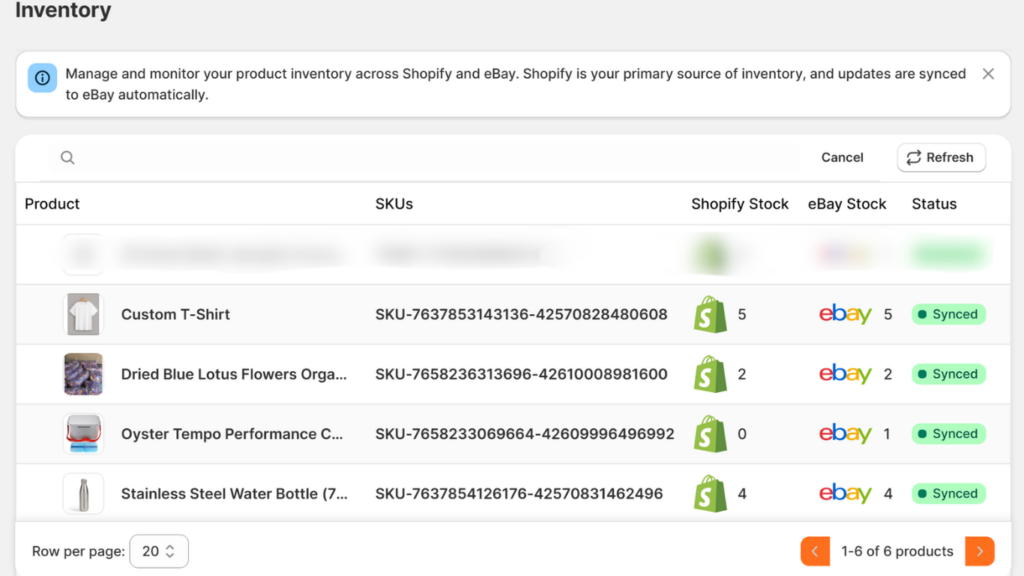
- You are able to click on both Shopify and eBay icons next to each product to navigate directly to the product page. This allows you to quickly review and update inventory on either platform.
- In some cases, stock quantities may not match between Shopify and eBay. This usually happens due to the following reasons:
- “Inventory not tracked” is enabled in Shopify: When this option is enabled, Shopify does not manage stock levels. Disable this option in the product settings to allow proper inventory sync.
- Inventory sync is not enabled in the app settings: Without this setting, inventory updates will not sync between platforms. Ensure Inventory Sync is enabled in your app settings.