Table of Contents
Connect Your eBay Account
To start syncing products, orders, and inventory between Shopify and eBay, you first need to connect your eBay account.
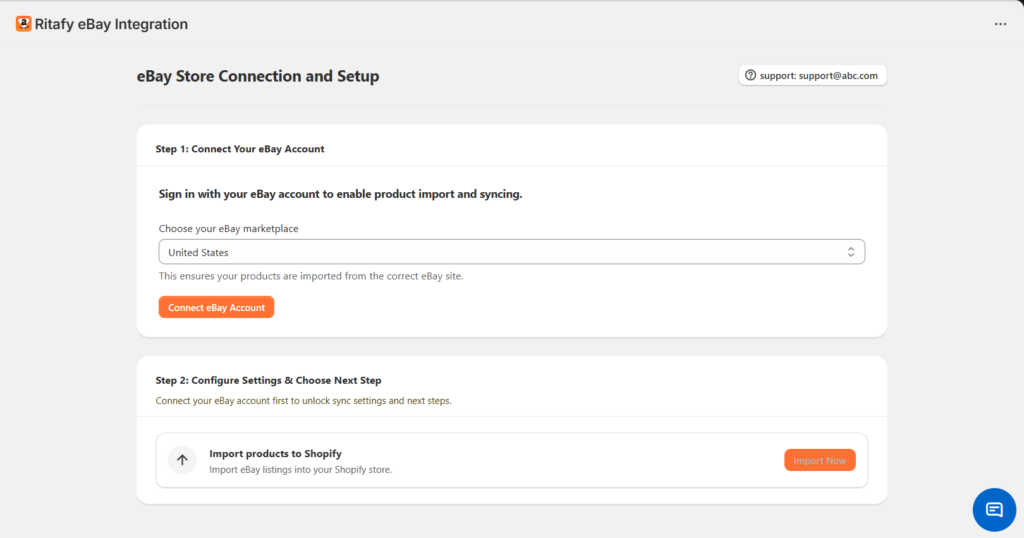
From the Home Page
- Open the Ritafy eBay Integration app in your Shopify admin.
- On the home screen, go to eBay Store Connection and Setup.
Connect Your eBay Account
- Under Step 1: Connect Your eBay Account, click the marketplace dropdown.
- Select your eBay marketplace (e.g., United States).
This ensures your data syncs with the correct regional eBay site. - Click Connect eBay Account.
- You will be redirected to eBay to sign in and authorize access.
- Log in to your eBay account and approve the connection.
Result
Once connected successfully:
- Your eBay account will be linked to Shopify
- You can start importing products and enabling sync features
Disconnect Your eBay Account
If you need to switch accounts or stop syncing, you can disconnect your current eBay store at any time.
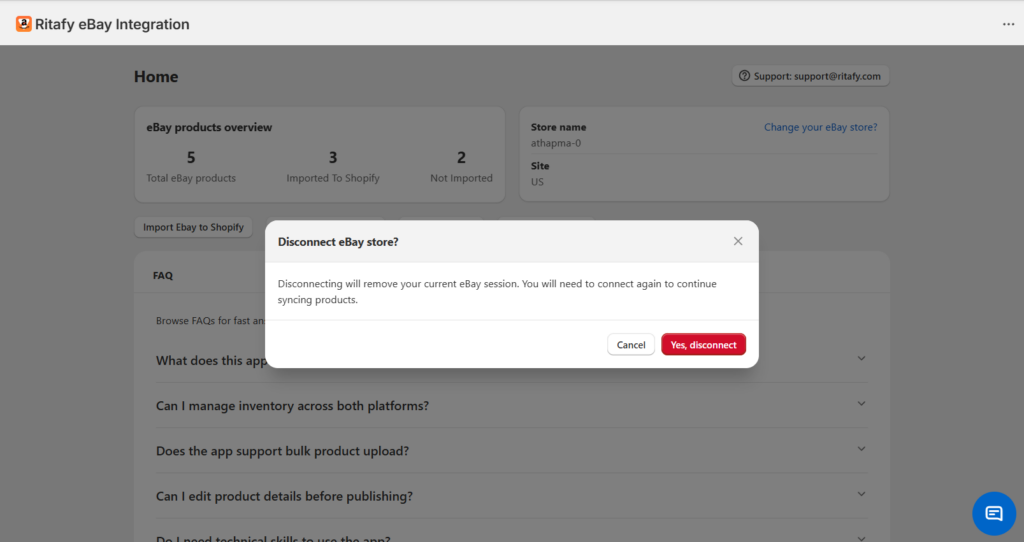
From the Home Page
- Open the Ritafy eBay Integration app.
- Go to the Home screen.
- In the Store name section, click Change your eBay store?
Confirm Disconnection
- A confirmation pop-up will appear.
- Review the message:
- Disconnecting will remove your current eBay session
- You will need to reconnect to continue syncing
- Click Yes, disconnect to proceed
- Or click Cancel to keep your current connection
Result
After disconnecting:
- Your eBay account will be unlinked from Shopify
- Product, order, and inventory syncing will stop
- You can reconnect a different eBay account anytime